[3 / 1 / 1]
Quoted By: >>1544142
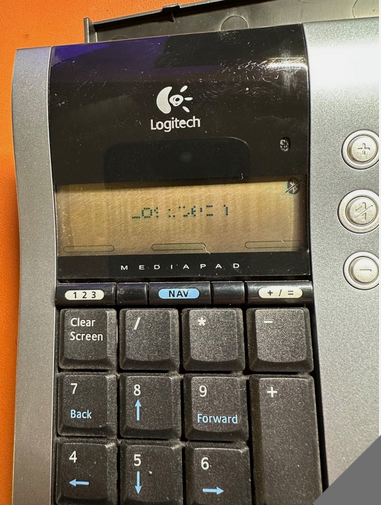
I bought a 'for parts' Logitech Bluetooth Keypad
>picrel how it used to be
and have since cleaned the PCB and the ribbon cables and got the display working again.
I want to use it as a CUSTOM KEYPAD by redefining the keypresses it generates, based on;
>/usr/share/X11/xkb/symbols/keypad
and I have this so far.
>
default hidden partial keypad_keys
xkb_symbols "extra_direction_keys" {
include "keypad(operators)"
key <KP7> { [ KP_Home, KP_7 ] };
key <KP8> { [ Up, KP_8, KP_Up ] };
key <KP9> { [ KP_Prior, KP_9 ] };
key <KP4> { [ Left, KP_4, KP_Left ] };
key <KP5> { [ Down, KP_5, KP_Down ] }
key <KP6> { [ Right, KP_6, KP_Right ] };
key <KP1> { [ KP_End, KP_1 ] };
key <KP2> { [ F5, KP_2 ] };
key <KP3> { [ KP_Next, KP_3 ] };
key <KPEN> { [ KP_Enter ] };
key <KPEQ> { [ KP_Equal ] };
key <KP0> { [ KP_Insert, KP_0 ] };
key <KPDL> { [ KP_Delete, KP_Decimal ] };
key <KPPT> { [ KP_Decimal, KP_Decimal ] };
};
>
So... how do I add this into the system?
How do I proceed from here?
Do I need to create a custom keyboard as a variant that refers to my new keypad_logitech_bluetooth or what?
Thanks in advance. Any help will be appreciated.
>picrel how it used to be
and have since cleaned the PCB and the ribbon cables and got the display working again.
I want to use it as a CUSTOM KEYPAD by redefining the keypresses it generates, based on;
>/usr/share/X11/xkb/symbols/keypad
and I have this so far.
>
default hidden partial keypad_keys
xkb_symbols "extra_direction_keys" {
include "keypad(operators)"
key <KP7> { [ KP_Home, KP_7 ] };
key <KP8> { [ Up, KP_8, KP_Up ] };
key <KP9> { [ KP_Prior, KP_9 ] };
key <KP4> { [ Left, KP_4, KP_Left ] };
key <KP5> { [ Down, KP_5, KP_Down ] }
key <KP6> { [ Right, KP_6, KP_Right ] };
key <KP1> { [ KP_End, KP_1 ] };
key <KP2> { [ F5, KP_2 ] };
key <KP3> { [ KP_Next, KP_3 ] };
key <KPEN> { [ KP_Enter ] };
key <KPEQ> { [ KP_Equal ] };
key <KP0> { [ KP_Insert, KP_0 ] };
key <KPDL> { [ KP_Delete, KP_Decimal ] };
key <KPPT> { [ KP_Decimal, KP_Decimal ] };
};
>
So... how do I add this into the system?
How do I proceed from here?
Do I need to create a custom keyboard as a variant that refers to my new keypad_logitech_bluetooth or what?
Thanks in advance. Any help will be appreciated.
